Beat the AI and speak to a real person
Whilst chatbots can be useful they have their limitations. Recent research from ServiceNow’s Consumer Voice Report 2024 reveals that the number of consumers preferring human interaction is increasing. According to the report, a staggering 75% of consumers try tactics to circumnavigate automations and 49% of them have shared their tactics online.
If you want to speak to a human…
@thecomplainingcow How to speak to a human on chat bots #chatbots #customerserviceproblems #Automation#Automated#OnlineChat
1) When faced with a bot the first thing to try is typing “Speak to a human”. This can work on live chat, automated bots and social media. Or use phrases like “This is urgent”, “This is an emergency”, “Escalate”, “Speak to a manager”, etc.
2) Deliberately put in wrong information! Systems are set up to ask for your account number etc. and then search but if you confuse it, then it may kick the next stage in of needing to speak to a human. In a similar way type rubbish or a long complicated sentence in to confuse the bot. You might as well amuse yourself whilst being annoyed with the bot!
3) If the bot asks you if it can help or do more, repeat “no”, it might get the message to ask a human! No problem with giving it negative feedback, remember, it doesn’t have feelings!
4) If you are on a site for a service, such as broadband, tell the bot that you want to “cancel”. In the same way that on the phone saying this can get you to the department who will reduce your contract, this tactic may take you to a human to try to convince you not to leave. Or say you have a payment issue, businesses want to resolve these types of issues more than anything else!
5) Try using the bot during normal office hours, as some companies may have a human available during this time.
6) Try a different platform, some companies will have different systems for their website, app and social media.
7) Simply refuse to use it. Write an email to customer service and if the site does not provide a customer service email address, obtain the CEO’s email address from ceoemail.com. The CEO may not respond personally but it does get your escalated complaint into the system.
8) If you are struggling to speak to a human on the phone press “0” straight away, this sometimes gets you straight through to a human, bypassing all the other options.
9) If you have listened to all the options and none of them fit or one seems more likely to have a human, choose that one.
10) Hold on the phone and don’t enter any information it requests. When the system doesn’t get a number inputted it will often say “I will transfer you to someone who can help”. Bingo, a human.
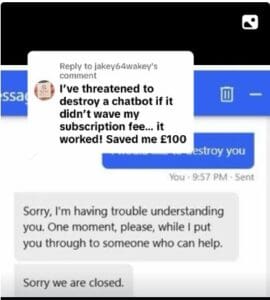
A bonus tip which I really like comes from a follower:
Further help with complaining effectively to a company

For masses of information, tips, guidance, laws and regulations and templates GET THE BOOK! How To Complain: The ESSENTIAL Consumer Guide to Getting REFUNDS, Redress and RESULTS!

Want to get better at complaining? See 101 Habits of an Effective Complainer
Save yourself time and effort finding the laws and wording a letter of complaint and download a template, fill in your details and get that redress